- AUTOMATION EQUIPMENT
- DIGITAL CONTROL
- ELECTRICAL ITEMS
- AMPLIFIER & UPS
- BATTERY CHARGER & INVERTER
- CIRCUIT BREAKER & BLOCKS
- CONTROL UNIT
- ELECTRIC CONTROLLERS
- FIRE ALARAM SYSTEM
- FUSES & CAPACITOR
- HEADPHONE & SPEAKER
- HMI & DISPLAY
- MISC ELECTRICAL
- PCB
- PLC SYSTEMS
- POWER SUPPLY
- PRINTER & CPU
- RELAY
- SENSORS
- SERVO DRIVES & MOTORS
- TELECOME & COMMUNICATION
- THERMOSTAT
- MACHINERY
- SENSORS
- UNCATEGORIZED



Hotline Order:
(+91) 97257 54777
Email ID:
shipnavstore@gmail.com

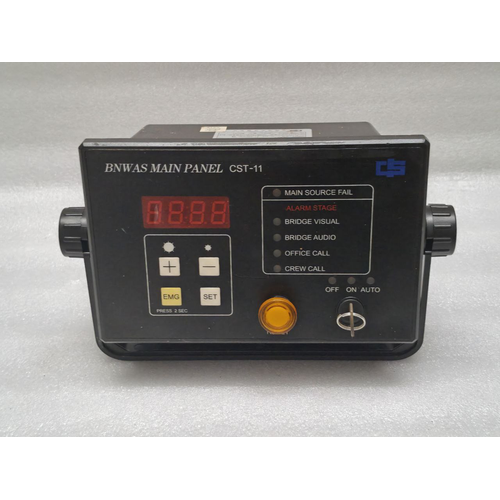
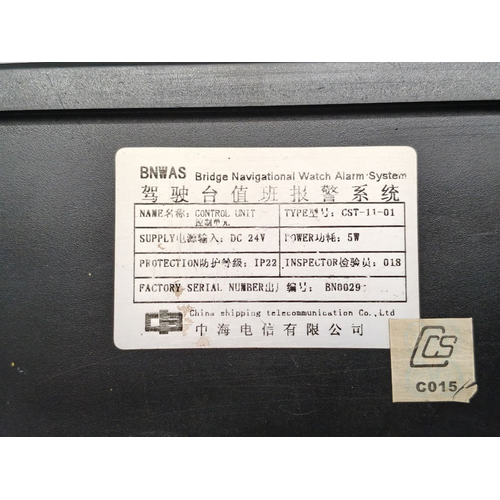
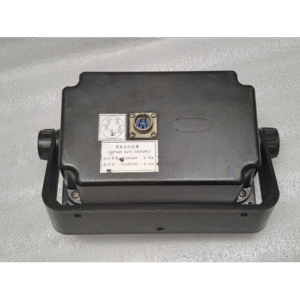
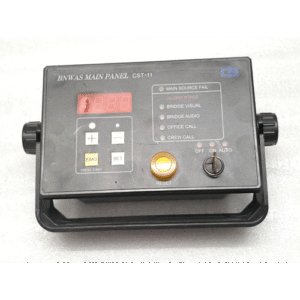
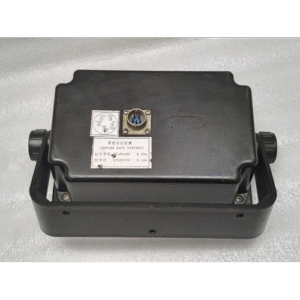
BANWAS MAIN PANEL CST 11 CONTROL UNIT BRIDGE NAVIGATIONAL WATCH ALARAM SYSTEM
₹33,835.00
| Product Conditioned | USED |
|---|
Free Shipping apply to all orders over $199
Guaranteed Money Back in 30 days return.
24/7 Customer Support
Share:
 BANWAS MAIN PANEL CST 11 CONTR...
₹33,835.00
1 in stock
Hotline Order:
(+101) 5620 - 8155
Email ID:
xstore@support.com
BANWAS MAIN PANEL CST 11 CONTROL UNIT BRIDGE NAVIGATIONAL WATCH ALARAM SYSTEM
POWER SUPPLY DC 24V
. Executive Overview
The BANWAS Main Panel, also known as the CST 11 Control Unit, is the central processing and control hub of a SOLAS-compliant Bridge Navigational Watch Alarm System (BNWAS). Its primary function is to monitor bridge activity and ensure that a proper navigational watch is being maintained at all times, thereby significantly enhancing maritime safety by preventing accidents caused by officer inattention or incapacitation.
This robust and intuitive unit automatically activates a series of escalating visual and audible alarms if it does not detect proactive resetting from the Officer of the Watch (OOW) within pre-set time intervals.
2. Key Features & Functions
-
Central Control & Processing: Serves as the brain of the BNWAS, managing all timing sequences, alarm escalation, and system status.
-
Comprehensive Status Display: A clear LCD or LED display shows:
-
System status (STANDBY, MONITORING, ALARM).
-
Current operational mode (AUTO, MANUAL).
-
Countdown timer to the next reset requirement.
-
Status of connected remote panels and reset units.
-
-
Programmable Timer Settings: Allows authorized personnel (e.g., Master) to set the three critical time intervals as per SOLAS regulations:
-
Dormancy Period (3-12 min): The initial delay after activation before the first reset is required.
-
Reset Period (15 sec): The time given for the OOW to reset the system after the first visual alarm.
-
Alarm Escalation Period (15 sec): The delay before alarms escalate to the next level (e.g., to the Master’s cabin or other locations).
-
-
Manual & Automatic Operation Modes:
-
Manual Mode: Activated/deactivated by the OOW at the start and end of a watch.
-
Automatic Mode: Automatically activates when the ship’s gyrocompass or ECDIS indicates “under way.”
-
-
Multi-Stage Alarm Escalation: Manages the entire alarm sequence:
-
Visual Alert: A flashing light on the main panel and remote units.
-
First Audible Alarm: A local audible alarm on the bridge after the reset period expires.
-
Secondary Alarm: If not reset, the alarm escalates to a second location (e.g., the Master’s cabin, Chief Officer’s cabin, or a common mess room) after the escalation period.
-
-
System Reset Function: Features a dedicated, high-integrity reset button that requires a deliberate press from the OOW to confirm alertness.
-
Remote Unit Interface: Connects to and controls multiple remote reset units, alarm panels, and cancel units located across the bridge, in officers’ cabins, and other designated areas.
-
Compliance Assurance: Designed and certified to meet the stringent requirements of IMO MSC.128(75), IEC 62616, and various classification society standards.
3. Physical & Technical Specifications (Typical)
-
Model: BANWAS Main Panel / CST 11 Control Unit
-
Housing: Robust, marine-grade metal or high-impact plastic.
-
Protection Rating: Typically IP22 or higher, suitable for the bridge environment.
-
Display: Backlit LCD or LED for clear visibility in all light conditions.
-
Controls: Tactile, membrane, or physical push-buttons.
-
Power Supply: 24V DC (standard vessel supply) or 110/220V AC.
-
Interfaces: Standard marine communication interfaces (e.g., NMEA 0183/2000, Serial) for connection to gyrocompass and ECDIS for automatic activation.
-
Connections: Terminal blocks for power, remote units, and external alarm outputs.
4. Operational Workflow
-
Activation: The system is set to MONITORING mode, either manually by the OOW or automatically by the ship’s navigation sensors.
-
Dormancy Period: A countdown timer begins (e.g., 12 minutes). No alarms are active.
-
Visual Alert: After the dormancy period, a flashing light activates on the main panel and all remote units.
-
Reset Opportunity: The OOW must move to any reset unit and press the reset button within the 15-second reset period.
-
First Audible Alarm: If not reset, a local audible alarm sounds on the bridge.
-
Secondary Escalation: If still not reset after another 15 seconds, a remote audible alarm is triggered in pre-designated locations (e.g., Master’s cabin).
-
System Reset: Pressing the reset button at any stage immediately silences the alarms and restarts the dormant timer, returning the system to the MONITORING state.
We're here when you need us
Get a Quick Quote
Complete our online form.
Call US
Speak to one of our team.
Live Chat
Send us a message
Speak to one of our team.